
Geeps Version 2.1
October 2026
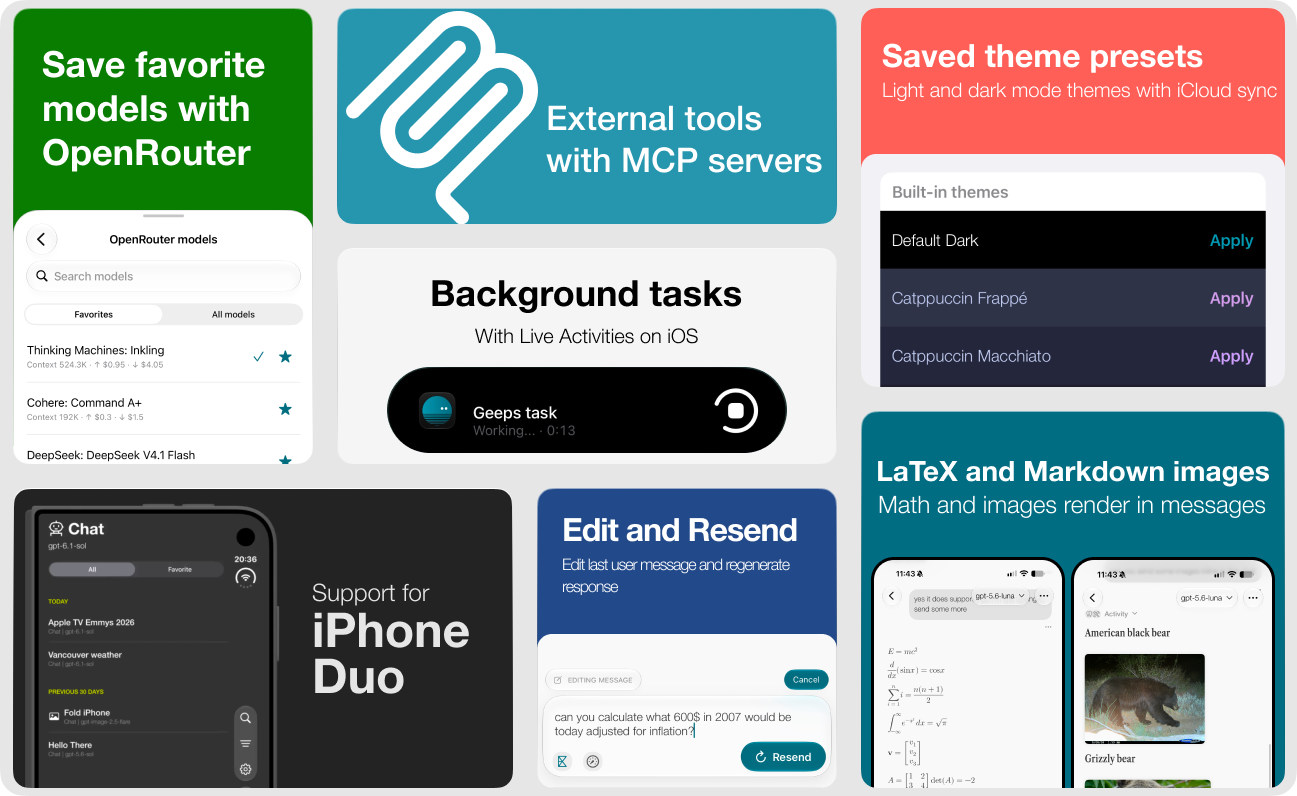
Geeps 2.1 now requires iOS and iPadOS 26 or later. The minimum macOS version stays at macOS Sequoia 15.
New features
- MCP servers (one server is free, unlimited servers with Geeps Plus)
- Connect compatible remote Model Context Protocol (MCP) servers over HTTPS and let models use their tools in your chats.
- Connect without credentials, with custom headers, or with OAuth sign-in.
- Test the connection and see the tools that each server provides.
- Choose default servers for new chats and select the servers that each conversation can use.
- Server settings sync with iCloud. Headers and OAuth tokens stay in the Keychain, so you sign in separately on each device.
- enable servers on each device separately
- Tool calls and results stay in the conversation history, even when a request fails or you cancel it.
- More search providers (requires Geeps Plus)
- Use Kagi, Brave, and TinyFish search in addition to Exa and provider web search. TinyFish search is free.
- Select the search provider for each chat from the Search control in the composer.
- Math and Markdown images
- LaTeX formulas render natively in messages, both inline and as display equations. Unsupported expressions keep their source text.
- Markdown images from HTTPS URLs load directly in messages and open in the image viewer.
- Edit & Resend
- Edit the latest message in a text chat and send it again. Its attachments stay, and the new response replaces the old one.
- tap
...under the last user message and tap edit icon
- tap
- Edit the latest message in a text chat and send it again. Its attachments stay, and the new response replaces the old one.
- Organized conversations
- Pin important chats to a separate section at the top of the sidebar.
- Sort chats by creation date or latest activity, and filter them by provider. You can also filter to show images only.
- OpenRouter model list improvements
- Improved model picker includes search, shows context window size and pricing for each model
- Save favorite OpenRouter models for quick access - model picker in chat will only show favorites after they are added.
- Saved themes
- Save named light and dark color themes. Saved themes sync with iCloud, but you can enable different themes on each device.
- Start from the bundled Default, Catppuccin, and Tokyo Night presets.
- Choose a separate font for Markdown headings.
- Better image references (requires Geeps Plus)
- Attach up to six images to a message.
- Use multiple reference images with compatible OpenAI and OpenRouter image editing models.
- Photos picker is improved and allows selecting multiple images at once.
- Background processing on iOS
- Turn on the new setting to let chat and image tasks continue when you leave the app. Progress shows in a Live Activity. iOS controls when background work is available and how long it can run - sometimes the system may still kill the task. This functionality may be extended in the future with workarounds for background activities.
- Thinking level control is also available in the message composer for easy switching.
- iPhone Duo support including a vertical composer toolbar and a wider sidebar. Geeps should look great in all layouts on iPhone Duo.
Improvements and bug fixes
- Added a compact composer that collapses and expands when you type, attach files, or edit a message.
- Tools can now do more work in one response: up to 32 rounds and 128 tool calls, with up to four calls at the same time. When the limit is reached, the model writes a final answer.
- Added warnings when a response reaches the output token limit or the context limit. Geeps keeps the useful partial text and completed images.
- Models now know the date and time zone when the conversation started.
- Reasoning and tool calls are now inside of Activity disclosure view
- Additional icons added to the provider icon picker.
- Improved chat image sizing, attachment removal, and image loading UI
- Provider errors inside streamed responses are now shown, and interrupted streams are reported instead of treated as complete.
- Fixed selecting None in the chat prompt picker.
Many other smaller fixes and improvements under the hood.